Komatsu PLM Payload Manager Operation and Maintenance Manual (SEAD032801)
On a Komatsu machine that’s loading trucks all day in a quarry, mine, or construction site, the PLM Payload Manager is what keeps your loads consistent and your cycle times predictable. This manual helps you run and care for the PLM system so it keeps weighing accurately and talking properly to the rest of the machine. When an operator complains the load counts look off or the system isn’t recording shifts correctly, this is what I’d use to walk through the checks, verify settings, and get the payload readings back in line without pulling the machine out of production any longer than necessary.
Applications & Use Cases
- Set up and verify PLM operation after a repair, battery change, or software update.
- Trace odd payload readings by checking sensors, wiring, and basic calibration steps.
- Train new operators on proper PLM use so loads stay within target and haul units aren’t abused.
- Build a preventive check routine to spot PLM issues before they slow down loading.
- Plan short service windows to adjust, test, and confirm the system without disrupting the shift.
FAQ
Q: Can I keep this manual on a tablet in the cab or workshop?
A: Yes, it’s practical to use digitally so you can zoom diagrams and follow steps right at the machine.
Q: Is it worth printing certain pages?
A: I’d print the routine check and troubleshooting pages you use most and keep them in a plastic sleeve on site.
Safety Note
Always disable machine movement and follow lockout/tagout rules before inspecting or adjusting any PLM-related components.
📘 Show Index
Komatsu PLM Payload Manager Index:
- MAIN MENU
- COVER
- PLM PAYLOAD MANAGER <OPERATION MODE>
- CONTENTS
- CHAPTER 1. ITEMS TO BE CHECKED TO RUN PLM PAYLOAD MANAGER
- (1.1) HARDWARE REQUIREMENT
- (1.2) APPLICABLE PLM’S AND TRUCK MODELS OF THIS MANUAL
- (1.3) COMPOSITION OF DEVICES
- (1.4) SETTING UP DEVICES
- CHAPTER 2. INSTALLING PROCEDURES
- CHAPTER 3. COMPOSITION OF SCREENS
- CHAPTER 4. EXPLANATION OF FUNCTIONS OF EACH SCREEN
- (4.1) EXPLANATION OF FUNCTIONS OF EACH SCREEN
- (4.2) G1000 <CONNECTED DEVICES SELECTION MENU> SCREEN
- (4.3) G2000 <MAIN MENU> SCREEN <OPERATOR MODE>
- (4.4) G2100 <DOWNLOAD> SCREEN
- (4.5) G2200 <PARAMETER SETTING> SCREEN
- (4.6) G2210 <INITIAL SETTING> SCREEN
- (4.7) G2220 <USER’S COMMENT> SCREEN
- (4.8) G2230 <MEMORY CARD FORMAT> SCREEN
- (4.9) G2300 <PLM REMOTE CONTROL> SCREEN
- (4.10) G2310 <PARAMETER SETTING> SCREEN (PLM REMOTE CONTROL)
- (4.11) G2311 <PLM DATA SETTING> SCREEN
- (4.12) G2312 <TIME/DATA SETTING> SCREEN
- (4.13) G2320 <CALIBRATION> SCREEN
- (4.14) G2330 <MEMORY CARD DUMP> SCREEN
- (4.15) G2340 <OPERATION FOR DISPLAY> SCREEN
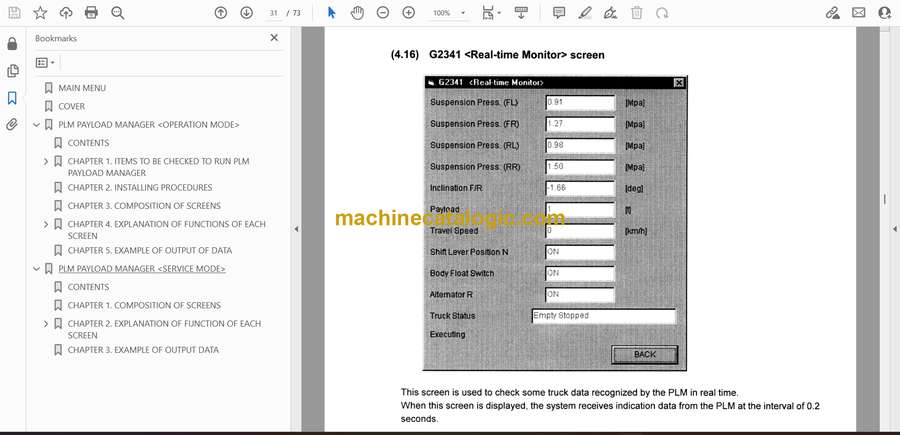
- (4.16) G2341 <REAL-TIME MONITOR> SCREEN
- (4.17) G2342 <CALIBRATION DATA> SCREEN
- (4.18) G2343 <PLM SIDE SWITCHES> SCREEN
- (4.19) G2344 <TOTAL PAYLOAD & OVERALL NO. OF CYCLES> SCREEN
- (4.20) G2350 <DATA CLEAR> SCREEN
- CHAPTER 5. EXAMPLE OF OUTPUT OF DATA
- PLM PAYLOAD MANAGER <SERVICE MODE>
- CONTENTS
- CHAPTER 1. COMPOSITION OF SCREENS
- CHAPTER 2. EXPLANATION OF FUNCTION OF EACH SCREEN
- (2.1) STARTING SCREEN
- (2.2) G1000 <CONNECTED DEVICES SELECTION MENU> SCREEN
- (2.3) G2000 <MAIN MENU> SCREEN <OPERATOR MODE>
- (2.4) G3000 <SERVICE CHECK MENU> SCREEN
- (2.5) G3100 <DOWNLOAD> SCREEN
- (2.6) G3200 <PLM REMOTE CONTROL> SCREEN
- (2.7) G3210 <PARAMETER SETTING> SCREEN
- (2.8) G3211 <TRUCK MODEL DATA SETTING> SCREEN
- (2.9) G3212 <EXTERNAL DISPLAY LAMPS> SCREEN
- (2.10) G3213 <DIMMING FOR PLM DISPLAY> SCREEN
- (2.11) G3220 <MEMORY CARD DUMP> SCREEN
- (2.12) G3230 <FORCIBLE PROHIBITION OF SWITCH SETTING 1/2> SCREEN
- (2.13) G3231 <FORCIBLE PROHIBITION OF SWITCH SETTING 2/2> SCREEN
- (2.14) G3240 <DATA CLEAR> SCREEN
- CHAPTER 3. EXAMPLE OF OUTPUT DATA
Link Belt