Case CX15EV Mini Excavator Operators Manual (92733797, B280101081) (August 2025)
This CX15EV is a small electric excavator, so you’re talking tight sites, indoors, near buildings, utilities, landscaping—places you don’t want noise or fumes. This operators manual is what you use to trace what every control actually does, how it reacts under load, on a slope, or when you’re tracking through wet ground. Say you’re loading a small dump trailer on a muddy driveway: the book walks you through how to set the work mode, check your battery level, and position the blade so you don’t slide or bury the tracks.
Applications & Use Cases
- Learn how to start, shut down, and park it correctly so you don’t leave pressure in the lines or drain the battery overnight.
- Trace the daily walk‑around: inspect tracks, test safety switches, check hydraulic leaks, verify boom and blade movement before you get near anything expensive.
- See how to align the machine on a slope, when to keep the blade downhill, and how to route your travel path so you don’t spin in soft spots.
- Use the control explanations to isolate weird behavior—slow swing, jerky travel—and know what to check before calling a tech.
- Follow the steps to connect, bleed, and disconnect attachments so you don’t pop a hose or fight trapped pressure.
FAQ
Q: Is this a PDF I can search on my phone or laptop?
A: Yes, you can usually search by word, so you can jump straight to things like “battery,” “auxiliary hydraulics,” or “transport.”
Q: Can I print just a few pages to keep in the cab?
A: You probably can; most folks print the safety, controls layout, and daily checks, then keep the full file on a tablet or phone for deeper stuff.
Safety Note
Always drop the attachment to the ground, shut down, and release hydraulic pressure before you crack any line or disconnect a hose.
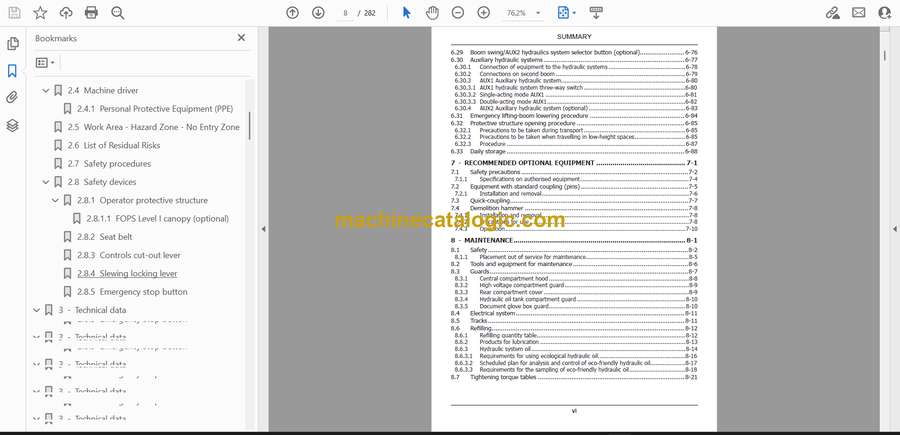
Case CX15EV Mini Excavator Index:
- 1 - INTRODUCTION
- 1.1 Regarding this manual
- 1.1.1 Manual consultation and terminology
- 1.2 Machine identification data
- 1.3 Manufacturer
- 1.3.1 Contact the after-sales network
- 1.4 Spare Parts
- 1.5 Information to the owner of the machine
- 1.6 Intended use
- 1.7 Prohibited use
- 2 - Safety
- 2.1 Safety symbol
- 2.2 General safety
- 2.2.1 Manual safety sign consultation
- 2.3 Safety signs and operation related labels
- 2.4 Machine driver
- 2.4.1 Personal Protective Equipment (PPE)
- 2.5 Work Area – Hazard Zone – No Entry Zone
- 2.6 List of Residual Risks
- 2.7 Safety procedures
- 2.8 Safety devices
- 2.8.1 Operator protective structure
- 2.8.1.1 FOPS Level I canopy (optional)
- 2.8.2 Seat belt
- 2.8.3 Controls cut-out lever
- 2.8.4 Slewing locking lever
- 2.8.5 Emergency stop button
- 3 - Technical data
- 3.1 General data
- 3.2 Engine
- 3.3 Power supply
- 3.4 Battery charge times
- 3.5 Electrical system
- 3.6 Hydraulic system
- 3.7 Performances
- 3.8 Digging arm
- 3.9 Dozer blade
- 3.10 Undercarriage
- 3.11 Fluid capacities
- 3.12 Brakes
- 3.13 Nominal lifting capacity
- 3.14 Rotary structure
- 3.15 Overall dimensions
- 4 - Transporting the machine
- 4.1 Shipping dimensions
- 4.2 Loading/unloading operations
- 4.3 Securing the machine on the means of transport
- 4.4 Lifting of the machine
- 4.5 Recovering and pulling the machine
- 5 - Controls and tools
- 5.1 Description of main controls and levers
- 5.2 Description of left control console
- 5.3 Description of right control console
- 5.4 Roller operation
- 5.5 Optional electrical buttons on the joystick
- 5.6 Auxiliary power socket on console
- 5.7 Machine status warning indicators
- 5.8 Control panel
- 5.9 Display
- 5.10 Battery disconnect switch (emergency stop button)
- 5.11 Geo-localisation system (optional)
- 6 - Using the machine
- 6.1 Commissioning
- 6.2 Battery disconnect switch (emergency stop button)
- 6.3 Driver’s seat
- 6.4 Arm rests
- 6.5 Seat belt
- 6.6 Controls cut-out lever
- 6.7 Slewing locking lever
- 6.8 Auxiliary electrical socket for the rotating head lamp
- 6.9 Control panel operation
- 6.10 HOME page
- 6.10.1 Time
- 6.10.2 Machine hours
- 6.10.3 Control mode
- 6.10.4 Engine data and battery data
- 6.10.5 Pop-up messages (information/alarms)
- 6.10.6 Warning indicators
- 6.10.7 Menu button
- 6.10.8 Working lights indicator lights
- 6.10.9 Dozer blade mode/undercarriage width indicator light
- 6.10.10 Work mode management
- 6.11 MENU screen
- 6.11.1 BATTERY screen
- 6.11.2 ENGINE screen
- 6.11.3 EQUIPMENT screen
- 6.11.3.1 Equipment SETTINGS sub-menu
- 6.11.4 TEMPERATURES screen
- 6.11.5 SOFTWARE screen
- 6.11.6 SERVICE screen
- 6.11.7 SETTINGS screen
- 6.11.7.1 CONTROL START MODE
- 6.11.7.2 PRESSURE RELIEF
- 6.11.7.3 PARTIAL HOURS RESET
- 6.11.7.4 LANGUAGE sub-menu
- 6.11.7.5 DATE/TIME sub-menu
- 6.11.7.6 COMMAND CONFIGURATION
- 6.11.7.7 UNIT OF MEASURE
- 6.11.7.8 DISPLAY BRIGHTNESS
- 6.11.8 LIFETIME DATA COUNTER Screen
- 6.11.9 CONTROL MODE screen
- 6.11.9.1 INDIVIDUAL sub-menu
- 6.12 Visibility
- 6.13 Starting the machine
- 6.13.1 Checks prior to the start up
- 6.13.2 Procedure for starting the machine
- 6.14 Battery power
- 6.15 Machine charging mode
- 6.15.1 On-board battery charger
- 6.15.2 Portable battery charger (optional)
- 6.16 Electrical isolation
- 6.17 Horn
- 6.18 Work lights
- 6.19 Operating at low temperatures
- 6.20 Precautions during operation
- 6.21 Stopping and parking the machine
- 6.22 Machine movement
- 6.22.1 Forward and reverse travel
- 6.22.2 Pivoting the machine around its axis
- 6.22.3 Turning while moving forward
- 6.22.4 Turning while reversing
- 6.22.5 Precautions during the operation of the tracks
- 6.23 Travel speed
- 6.24 Dozer blade control/undercarriage width adjustment lever
- 6.24.1 Dozer blade control
- 6.24.2 Undercarriage width adjustment control
- 6.25 Extendible dozer blade with extensions
- 6.26 Operating the boom
- 6.26.1 Left Joystick
- 6.26.2 Right joystick
- 6.26.3 ISO-SAE controls layout TPSS function
- 6.27 Boom swing control
- 6.28 Discharge residual pressure in the hydraulic system
- 6.29 Boom swing/AUX2 hydraulics system selector button (optional)
- 6.30 Auxiliary hydraulic systems
- 6.30.1 Connection of equipment to the hydraulic systems
- 6.30.2 Connections on second boom
- 6.30.3 AUX1 Auxiliary hydraulic system
- 6.30.3.1 AUX1 hydraulic system three-way switch
- 6.30.3.2 Single-acting mode AUX1
- 6.30.3.3 Double-acting mode AUX1
- 6.30.4 AUX2 Auxiliary hydraulic system (optional)
- 6.31 Emergency lifting-boom lowering procedure
- 6.32 Protective structure opening procedure
- 6.32.1 Precautions to be taken during transport
- 6.32.2 Precautions to be taken when travelling in low-height spaces
- 6.32.3 Procedure
- 6.33 Daily storage
- 7 - Recommended optional equipment
- 7.1 Safety precautions
- 7.1.1 Specifications on authorised equipment
- 7.2 Equipment with standard coupling (pins)
- 7.2.1 Installation and removal
- 7.3 Quick-coupling
- 7.4 Demolition hammer
- 7.4.1 Installation and removal
- 7.4.2 Precautions for use
- 7.4.3 Operation
- 8 - Maintenance
- 8.1 Safety
- 8.1.1 Placement out of service for maintenance
- 8.2 Tools and equipment for maintenance
- 8.3 Guards
- 8.3.1 Central compartment hood
- 8.3.2 High voltage compartment guard
- 8.3.3 Rear compartment cover
- 8.3.4 Hydraulic oil tank compartment guard
- 8.3.5 Document glove box guard
- 8.4 Electrical system
- 8.5 Tracks
- 8.6 Refilling
- 8.6.1 Refilling quantity table
- 8.6.2 Products for lubrication
- 8.6.3 Hydraulic system oil
- 8.6.3.1 Requirements for using ecological hydraulic oil
- 8.6.3.2 Scheduled plan for analysis and control of eco-friendly hydraulic oil
- 8.6.3.3 Requirements for the sampling of eco-friendly hydraulic oil
- 8.7 Tightening torque tables
- 8.8 Periodic maintenance
- 8.8.1 Performance check
- 8.8.2 Cleaning of radiator and heat sink
- 8.8.3 Check the hydraulic oil level
- 8.8.4 Change discharge circuit hydraulic oil filter
- 8.8.5 Hydraulic system oil sampling/replacement
- 8.8.6 Replacement of intake circuit hydraulic oil filter
- 8.8.7 Check the condition of hydraulic lines
- 8.8.8 Full charge of the battery
- 8.8.9 Check that the screws of the drive wheel/rollers are tight
- 8.8.10 Track service position
- 8.8.11 Track tension check
- 8.8.12 Adjusting the track tension
- 8.8.13 Translation motors and rotation gear motor
- 8.8.14 Lubrication of pins
- 8.8.15 Electrical test
- 8.9 Long inactivity periods
- 8.10 Long-term storage
- 9 - Electrical parts
- 9.1 Fuses and relays
- 9.2 Work lights replacement
- 9.3 LED strip replacement
- 9.4 Auxiliary battery
- 10 - RESCUE SHEET
CNH