$ 0
0
$ 0
0

PAT iFLEX5 Load Moment Indicator Service Manual (190154_G)

Format: PDF (Printable Document)

File Language: English

File Pages: 672

File Size: 25.48 MB (Speed Download Link)

File Count: 10 PDF files

Brand: PAT

Model: iFLEX5

Equipment Type: Load Moment Indicator

Book No: 190154_G

Manuals Included: 9 separate publications

Type of Document: Service Manual

Searchable: Yes, text is searchable and copyable

Delivery: Instant download after payment

Categories: ,

$ 55

Share:

PAT iFLEX5 Load Moment Indicator Service Manual (190154_G)

The iFLEX5 is PAT's load moment indicator. It reads boom angle, length, pressure and slew position, then compares the load against the crane's limits and shows the operator what's happening on the console. When it misreads or goes dark, the service manual is what you open before you start swapping sensors.

Crane service techs, rental fleet mechanics and independent shops reach for it when an LMI throws a fault, a sensor needs calibrating, or a used crane arrives with no paperwork.

What this manual helps you do

  • Diagnose a "No console display" condition and work through the "What's Wrong?" section.
  • Troubleshoot a sensor problem using the display, covering angle, length, pressure, slewing and load sensing.
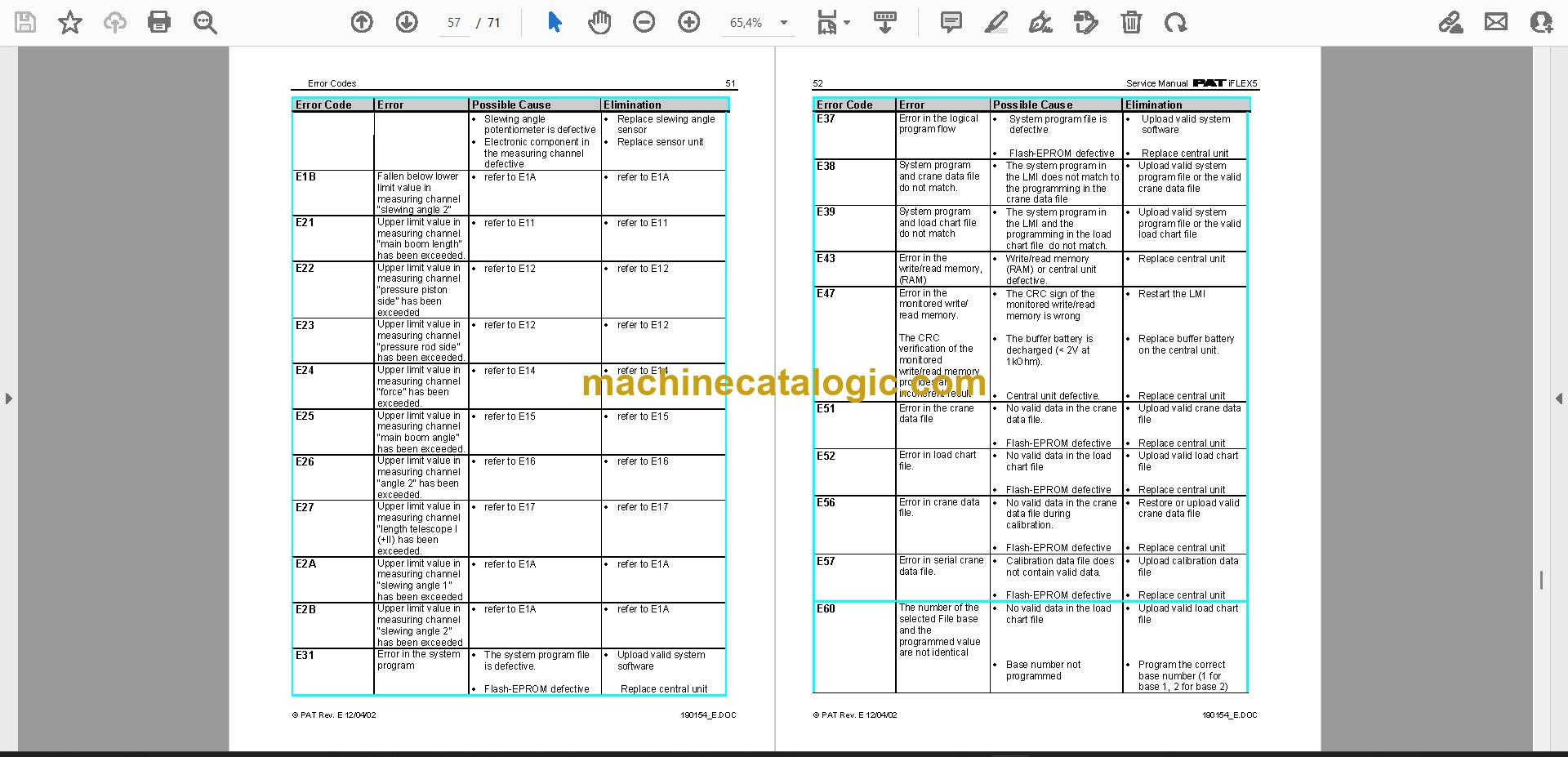
  • Look up error codes and follow the fault diagnosis steps that go with them.
  • Set sensor calibration through the service screen after a repair.
  • Trace communication faults, including the A2B problem and CAN-bus communication, and work through troubleshooting moisture.

Who this is for

A crane service technician or rental fleet mechanic who is fixing LMI faults in-house. It also suits a dealer technician or independent repair shop that needs the drawings and spare part listings in front of them at the crane.

FAQ

Q: What do I receive and how is it organised?

A: You get the set: 10 PDF files, 672 pages in total, in English. The text is searchable and copyable, so you can jump straight to an error code. The download holds 9 separate manuals: Manual 1 (44 pages), Manual 2 (79 pages), Publication 031-300-190-154 (71 pages), Publication 190154_E (71 pages), Publication 190154_G (83 pages, the main manual), Publication 190154_H (79 pages), Manual 7 (6 pages), Manual 8 (79 pages) and Publication 9333104130 (160 pages).

Q: Which machine does it fit?

A: It is written for the PAT iFLEX5 load moment indicator, and the title on the main manual reads "iFLEX5 Service Manual". The publication number is 190154_G.

Q: How does it fit my job?

A: If you're chasing a sensor fault, a blank console or a moisture problem, the sections on sensing, error codes and the service screen for calibration are laid out for that work. The iFLEX5 Boom Control System (BCS) section is there too.

If you're working on an iFLEX5, this set gives you the fault tracing, calibration and drawings to get the job done.

Click here to view the preview (PDF)

📘 Show Index

Table of Contents:

  • Publication 190154_G (83 pages)
    • General Information
    • Warnings
    • Description Of The System
      • DESCRIPTION OF SYSTEM FUNCTION
      • DESCRIPTION OF A CAN BUS SYSTEM
      • DESCRIPTION OF THE SYSTEM COMPONENTS
    • What’s Wrong?
    • Angle Sensing
      • ANGLE SENSING ERROR – FLOW CHART
    • Length Sensing
      • LENGTH SENSING ERROR – FLOW CHART
    • Pressure Sensing
      • PRESSURE SENSING ERROR – FLOW CHART
    • Slewing Sensing
      • SLEW SENSING ERROR – FLOW CHART
    • Load sensing
      • LOAD SENSING ERROR – FLOW CHART
    • No console display
    • A2B Problem
    • cann-bus communication
    • Troubleshooting a sensor problem using the display
    • iFLEX5 Boom Control System (BCS)
      • RT800E BASICS
      • Terminology
      • Components
    • Drawings
      • COMPONENTS OF THE LMI SYSTEM PAT iFLEX5
      • BLOCK DIAGRAM
      • ELECTRICAL SYSTEM DIAGRAM STANDARD SYSTEM
    • Spare Part Listings
    • Service Screen For Sensor Calibration
      • ACTIVATING THE SERVICE SCREEN FOR SENSOR CALIBRATION
      • ZERO-SETTING THE TRANSDUCER INPUTS
      • ZERO-SETTING THE SLEWING INPUTS
    • Error Codes
    • Troubleshooting Moisture
      • WATER INGRESS
      • CONDENSATION
  • Manual 1 (44 pages)
  • Manual 2 (79 pages)
  • Publication 031-300-190-154 (71 pages)
    • General Information
    • Warnings
    • Description Of The System
      • Description of the System Components
    • What's Wrong?
      • I have an error code indicated on the console
      • The displayed angle does not match the actual boom angle
      • The displayed length does not match the actual boom length
    • Angle Sensing
    • Length Sensing
    • Pressure Sensing
    • Slewing Sensing
    • Load sensing
    • No console display
    • A2B Problem
    • CAN-Bus Communication
      • Brief Description Of A Can Bus System
    • Troubleshooting A Sensor Problem Using The Display
    • Drawings
      • Components of the LMI system PAT iFLEX5
      • Block Diagram
      • Electrical System Diagram Standard System
    • Spare Part Listings
    • Service Screen For Sensor Calibration
      • Activating the Service Screen for Sensor Calibration
      • Zero-Setting The Transducer Inputs
      • Length Sensor Calibration Procedure
    • Error Codes
    • Troubleshooting Moisture
      • Water Ingress
      • Condensation
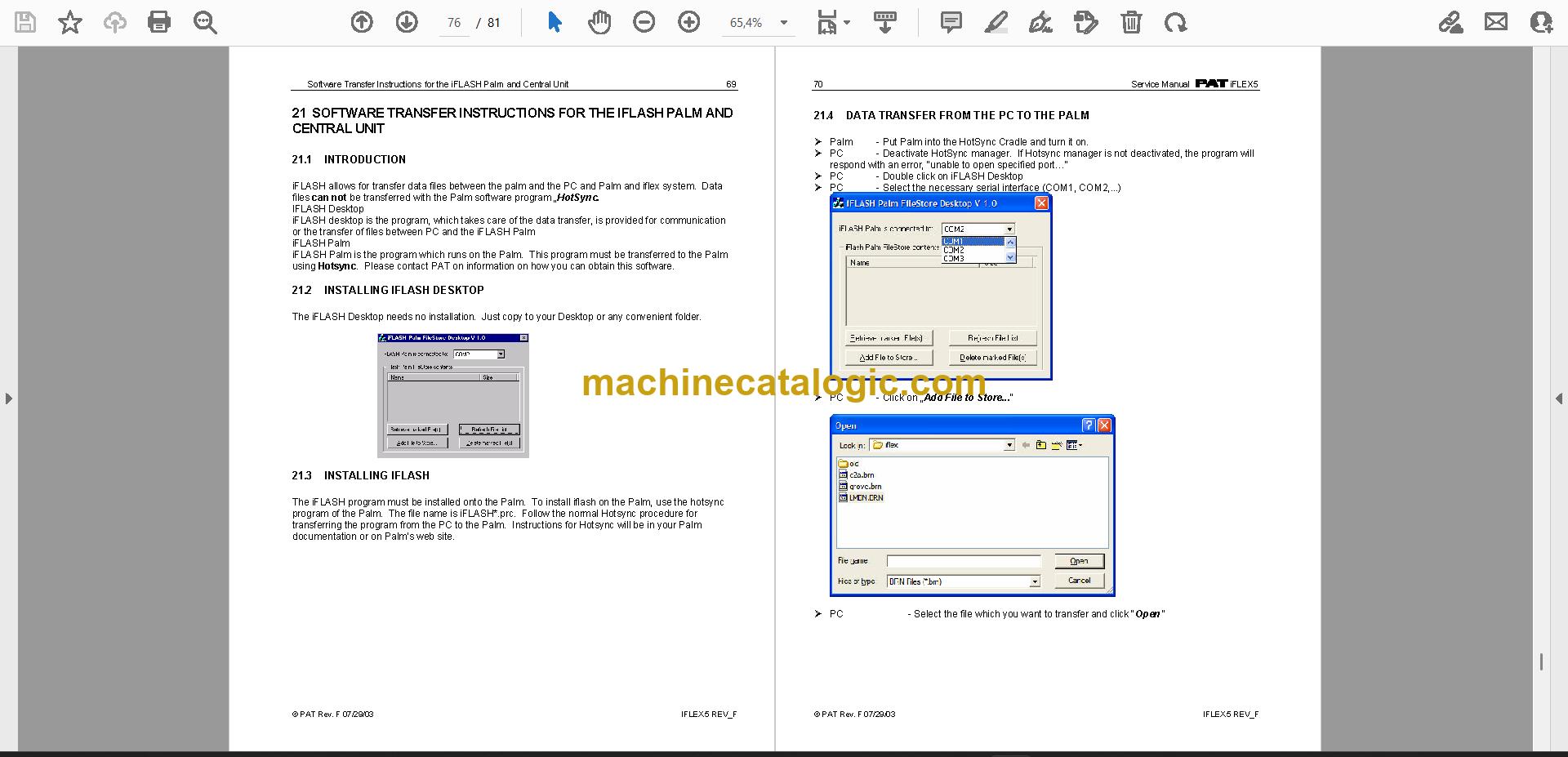
    • Software Transfer Instructions for the Console Using the flash module
    • Software Transfer Instructions for the iFLASH Palm and Central Unit
      • Introduction
      • Installing iFLASH Desktop
      • Installing iFLASH
  • Publication 190154_E (71 pages)
    • General Information
    • Warnings
    • Description Of The System
      • Description of the System Components
    • What's Wrong?
      • I have an error code indicated on the console
      • The displayed angle does not match the actual boom angle
      • The displayed length does not match the actual boom length
    • Angle Sensing
    • Length Sensing
    • Pressure Sensing
    • Slewing Sensing
    • Load sensing
    • No console display
    • A2B Problem
    • CAN-Bus Communication
      • Brief Description Of A Can Bus System
    • Troubleshooting A Sensor Problem Using The Display
    • Drawings
      • Components of the LMI system PAT iFLEX5
      • Block Diagram
      • Electrical System Diagram Standard System
    • Spare Part Listings
    • Service Screen For Sensor Calibration
      • Activating the Service Screen for Sensor Calibration
      • Zero-Setting The Transducer Inputs
      • Length Sensor Calibration Procedure
    • Error Codes
    • Troubleshooting Moisture
      • Water Ingress
      • Condensation
    • Software Transfer Instructions for the Console Using the flash module
    • Software Transfer Instructions for the iFLASH Palm and Central Unit
      • Introduction
      • Installing iFLASH Desktop
      • Installing iFLASH
  • Publication 190154_H (79 pages)
    • General Information
    • Warnings
    • Description Of The System
      • DESCRIPTION OF SYSTEM FUNCTION
      • DESCRIPTION OF A CAN BUS SYSTEM
      • DESCRIPTION OF THE SYSTEM COMPONENTS
    • What’s Wrong?
    • Angle Sensing
      • ANGLE SENSING ERROR – FLOW CHART
    • Length Sensing
      • LENGTH SENSING ERROR – FLOW CHART
    • Pressure Sensing
      • PRESSURE SENSING ERROR – FLOW CHART
    • Slewing Sensing
      • SLEW SENSING ERROR – FLOW CHART
    • Load sensing
      • LOAD SENSING ERROR – FLOW CHART
    • No console display
    • A2B Problem
    • cann-bus communication
    • Troubleshooting a sensor problem using the display
    • iFLEX5 Boom Control System (BCS)
      • RT800E BASICS
      • Terminology
      • Components
    • Drawings
      • COMPONENTS OF THE LMI SYSTEM PAT iFLEX5
      • BLOCK DIAGRAM
      • ELECTRICAL SYSTEM DIAGRAM STANDARD SYSTEM
    • Spare Part Listings
    • Service Screen For Sensor Calibration
      • ACTIVATING THE SERVICE SCREEN FOR SENSOR CALIBRATION
      • ZERO-SETTING THE TRANSDUCER INPUTS
      • ZERO-SETTING THE SLEWING INPUTS
    • Error Codes
    • Troubleshooting Moisture
      • WATER INGRESS
      • CONDENSATION
  • Manual 7 (6 pages)
  • Manual 8 (79 pages)
  • Publication 9333104130 (160 pages)
    • General Information
    • Warnings
    • Description Of The System
      • Description Of System function
      • Description Of A Can Bus System
      • Description of the System Components
    • What's Wrong?
      • I have an error code indicated on the console
      • The displayed angle does not match the actual boom angle
      • The displayed length does not match the actual boom length
    • Angle Sensing
    • Length Sensing
    • Pressure Sensing
    • Slewing Sensing
    • Load sensing
    • No console display
    • A2B Problem
    • CAN-Bus Communication
    • Troubleshooting A Sensor Problem Using The Display
    • iFLEX5 Boom Control System (BCS)
      • RT800E Basics
      • Tele Sequence
      • iFLEX5 BCS Digital Inputs
    • Drawings
      • Components of the LMI system PAT iFLEX5
      • Block Diagram
      • Electrical System Diagram Standard System
    • Spare Part Listings
      • GRAPHIC CONSOLE ASSY, VERTICAL PART NO. 9333103868
      • WIRING HARNESS sTANDARD, PART NO. 9333103869
      • WIRING HARNESS bOOM cONTROL, PART NO. 9333103911
    • Service Screen For Sensor Calibration
      • Activating the Service Screen for Sensor Calibration
      • Zero-Setting The Transducer Inputs
      • ZERO-SETTING THE SLEWING INPUTS
    • Error Codes
    • Troubleshooting Moisture
      • Water Ingress
      • Condensation
    • Software Transfer Instructions for the Console Using the flash module
    • Software Transfer Instructions for the iFLASH Palm and Central Unit
      • Introduction
      • Installing iFLASH Desktop
      • Installing iFLASH
    • What’s Wrong?
    • cann-bus communication

PAT PDF Manuals

All Crane Manuals

Related Manuals

0
0
Your Cart
Your cart is emptyReturn to Shop