
John Deere Service Advisor EDL3 Driver Download (EDL 3 Diagnostic Adapter)
Overview
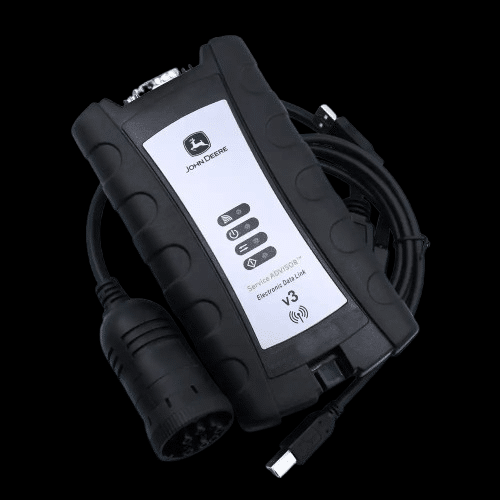
Download John Deere EDL3 Driver for use with John Deere Service Advisor diagnostic software. This driver enables stable communication between the EDL 3 adapter and John Deere equipment.
The EDL 3 (Electronic Data Link) adapter is used for diagnostics, troubleshooting, and maintenance of John Deere machines. It supports both Agriculture & Turf and Construction & Forestry equipment.
With the correct driver installed, the Service Advisor software can fully communicate with machine control units, allowing technicians to read fault codes, monitor parameters, and perform advanced diagnostics.
Supported Software:
– John Deere Service Advisor Agriculture & Turf
– John Deere Service Advisor Construction & Forestry
Supported Systems:
– John Deere agricultural equipment
– John Deere turf equipment
– John Deere construction machinery
– John Deere forestry equipment
Key Features:
– Stable communication with Service Advisor
– Supports EDL 3 interface
– Full diagnostics capability
– Reliable USB connection
Supported Operating Systems:
– Windows 10 (64 bit recommended)
– Windows 11 (limited support)
Common Issues Fixed:
– EDL 3 not detected
– Communication errors
– Driver installation issues
– Connection instability
Important Note:
Make sure Service Advisor is properly installed and configured before connecting the adapter.
—
Need full John Deere Service Advisor with installation?
We provide:
– Latest Service Advisor versions
– Agriculture & Turf + Construction & Forestry packages
– Driver setup and configuration
– Remote installation support
Contact us for full setup.
Installation Notes
1. Run the driver installer as Administrator
2. Complete the installation process
3. Connect the EDL 3 adapter via USB
4. Wait for Windows to detect the device
5. Verify the adapter in Device Manager
6. Launch Service Advisor and test connection
Note:
If the adapter is not detected, reinstall the driver or try a different USB port.
Compatibility Notes
Compatible with:
– John Deere Service Advisor Agriculture & Turf
– John Deere Service Advisor Construction & Forestry
✔ Supports all EDL 3 compatible machines
✔ Designed for John Deere diagnostics
Support Notes
Need John Deere Service Advisor fully installed and ready?
We offer:
– Complete software setup
– Driver installation and configuration
– Remote support
Contact us anytime.