
Caterpillar Communication Adapter 3 Driver Download (CAT Comm Adapter 3 V4.6.0.74)
Overview
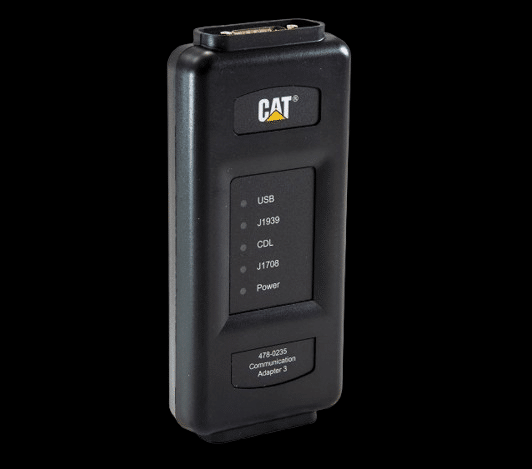
Download Caterpillar Communication Adapter 3 Driver V4.6.0.74 for reliable communication between your diagnostic software and Caterpillar or Perkins engines.
The CAT Comm Adapter 3 is the official interface used for diagnostics, troubleshooting, and maintenance of Caterpillar equipment and Perkins engines.
This driver is essential for establishing a stable connection between the adapter and software such as Caterpillar Electronic Technician (CAT ET) and Perkins Electronic Service Tool (EST).
Without the correct driver installed, the adapter may not be detected, or communication with the ECM may fail.
Supported Software:
– Caterpillar Electronic Technician (CAT ET)
– Perkins Electronic Service Tool (EST)
Supported Systems:
– Caterpillar construction equipment
– Caterpillar engines
– Perkins engines
Key Features:
– Stable communication with ECM systems
– Full compatibility with CAT ET
– Supports Perkins EST diagnostics
– Reliable USB connection
– Optimized for Comm Adapter 3
Driver Version:
– V4.6.0.74
Default Installation Path:
C:\Program Files (x86)\Caterpillar Inc\Comm Adapter 3
Supported Operating Systems:
– Windows 7 (32/64 bit)
– Windows 10 (64 bit recommended)
– Windows 11 (limited support)
Common Issues Fixed:
– Adapter not detected
– No communication with ECM
– Driver installation failure
– Connection instability
Important Note:
For best performance, ensure CAT ET is properly configured and the correct communication adapter is selected.
—
Need full CAT ET or Perkins EST software with installation?
We provide:
– Fully working CAT ET
– Perkins EST setup
– Driver installation and configuration
– Remote support
Contact us for complete diagnostic solution.
Installation Notes
1. Run the driver installer as Administrator
2. Follow the on-screen installation steps
3. Connect the CAT Comm Adapter 3 via USB
4. Allow Windows to complete device recognition
5. Verify the adapter in Device Manager
6. Open CAT ET or Perkins EST and confirm communication
Note:
If the device is not detected, reinstall the driver or try a different USB port.
Compatibility Notes
Compatible with:
– CAT Electronic Technician (CAT ET)
– Perkins Electronic Service Tool (EST)
✔ Supports Caterpillar and Perkins engines
✔ Designed for Comm Adapter 3 interface
Support Notes
Need CAT ET or Perkins EST fully installed and ready?
We offer:
– Complete diagnostic software setup
– Adapter configuration
– Remote installation support
Contact us anytime.